How to See Who Commented on a LinkedIn Post in 2026
See every comment on a LinkedIn post, fix the "comments not showing" problem, and turn commenters into a qualified lead list without risky extensions.
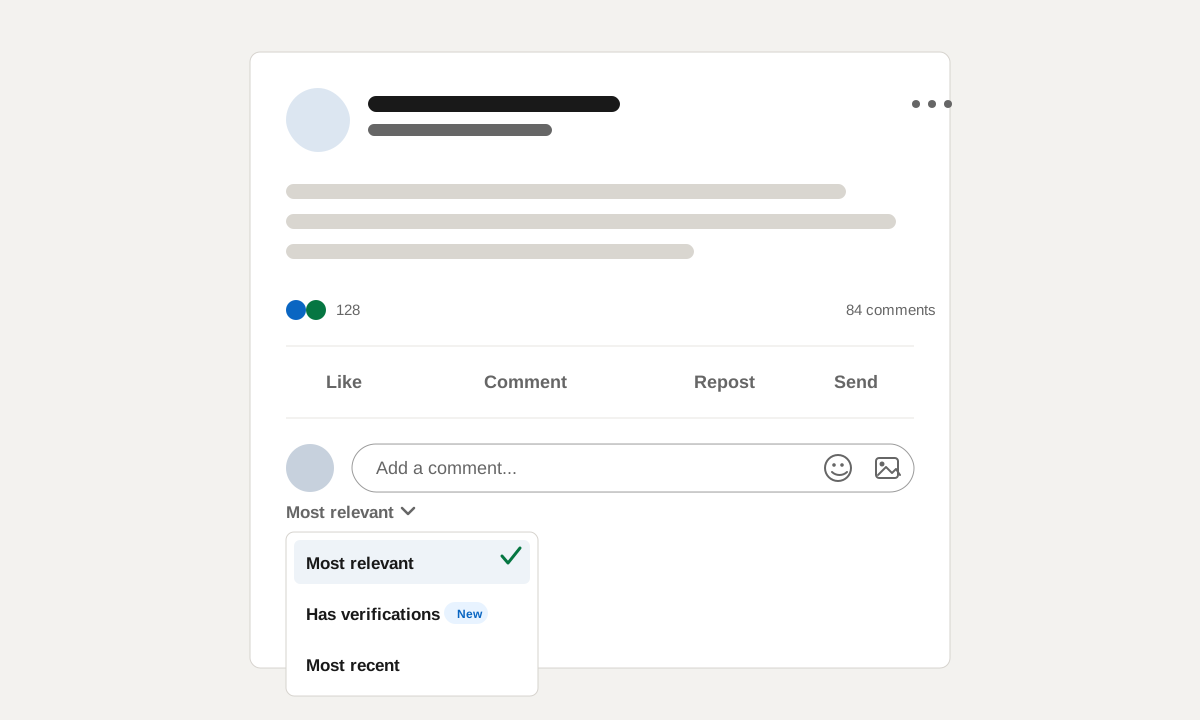
The 30-second answer: open the actual post, click the comment count, and switch the comment sort from "Most relevant" to "Most recent."
That sorting switch is what most people miss. LinkedIn's default view is not a clean chronological list. It hides comments LinkedIn thinks are less relevant, which makes the post look like comments are missing.
That answer is fine for one post out of curiosity. It is not fine if you are mining fifty LinkedIn posts a month for buyers. This guide covers both: the native way to see the comments, and the workflow for turning commenters into a usable lead list.
The Quick Answer: See All Comments on Any Post
To see who commented on a LinkedIn post:
- Open the actual post URL, not the feed preview.
- Click the comment count under the post.
- Find the comment sort dropdown above the comment thread.
- Switch the dropdown from "Most relevant" to "Most recent."
- Expand collapsed replies if the conversation has threaded responses.
- Open promising commenters in new tabs so you can inspect their profile, role, company, and recent activity.
The key detail is step four. "Most relevant" is not only a sort order. In practice, it acts like a filter. LinkedIn suppresses comments it scores as less useful to you, so the count can say 84 comments while the visible list feels much shorter.
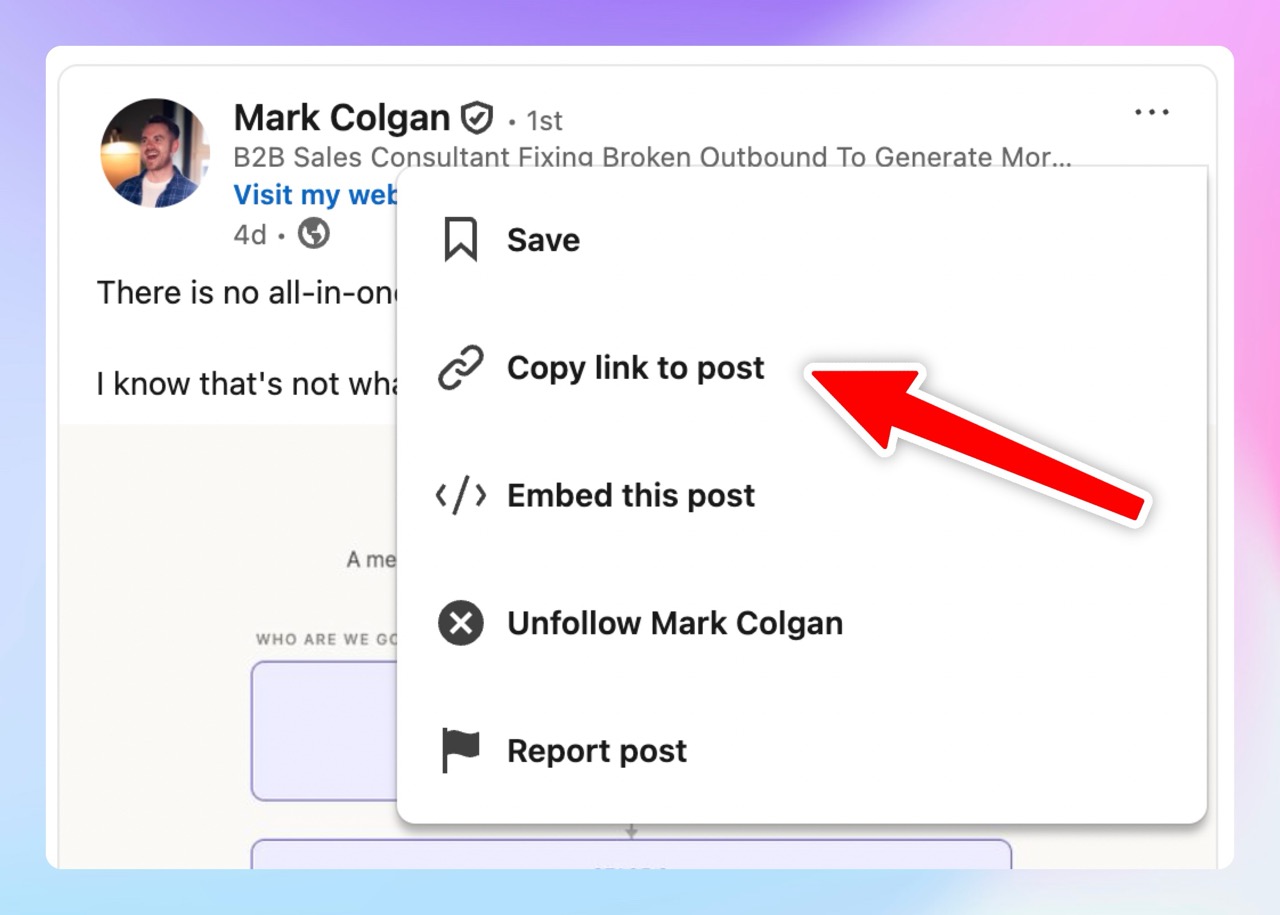
If you need the post URL first, open the post menu and copy the link. The standalone URL is easier to share with a teammate, attach to a CRM record, or revisit later when the thread grows.
Why Some Comments Still Don't Show Up
Switching to "Most recent" solves the most common problem, but it does not guarantee a perfect list. LinkedIn comments are still affected by visibility, deletion, account state, and reshares.
The Author Limited Who Can Comment
Post authors can restrict who can comment, often to connections only. In that case, you are seeing the comments that exist, but the pool of possible commenters was filtered before anyone typed a reply.
Out-of-Network and Private Profiles
Some commenters show with limited profile information depending on their visibility settings and your degree of connection. The comment text may be visible while the person behind it is harder to identify, especially if their headline, company, or activity is partially hidden.
Deleted Comments and Deactivated Accounts
The visible count can lag reality. Deleted comments, moderated comments, and closed accounts can leave gaps between the number shown under the post and the people you can actually inspect in the thread.
Reshares Split the Conversation
Comments on a reshare live on the reshare, not the original post. If a post went semi-viral because several people reposted it with their own commentary, the original post may show only a fraction of the total conversation.
Check the repost count, open the larger reshares, and inspect those comment threads separately. For sales research, the best comment is often on the reshare from a customer, competitor, or category voice, not on the original author's post.
Why Commenters Are Worth More Than Likers
A like is a signal. A comment is a sentence about what the person cares about, in their own words.
That sentence can reveal the pain, objection, use case, or internal politics behind the engagement. A VP of Sales who likes a post about outbound quality might be generally interested. A VP of Sales who comments, "The real problem is ramp time, not list size," just told you what part of the problem matters.
For outreach, the comment becomes context. You do not have to guess why they engaged. They told you.
This does not mean every commenter is a lead. Some are peers, vendors, recruiters, students, or people outside your market. But when a commenter also matches your ICP, the signal is stronger than a plain reaction. If you need the same workflow for people who reacted without commenting, read the same workflow for people who liked the post.
Where the Manual Route Breaks
The manual route is simple until you try to use it as a repeatable pipeline source.
For each commenter, you usually need four things:
- Name
- Headline or current role
- LinkedIn profile URL
- Full comment text
Copying all four cleanly takes longer than it sounds. You open the profile, confirm the current company, copy the URL, return to the comment thread, copy the comment text, paste it into a sheet, and avoid losing your place in the modal. Even with a good rhythm, that is usually 90 seconds or more per person.
A good post in your niche can have 100 to 300 comments. At 90 seconds each, 100 commenters is two and a half hours before enrichment, scoring, deduping, or CRM routing. At 300 commenters, you are deep into a full workday for one post.
Then the backlog compounds. The posts worth mining usually publish weekly. Your founder posts, competitors post, customer champions post, category creators post, and one viral thread can create more research work than a rep can clear.
That is the real reason people search "how to see who commented on a LinkedIn post." They are not only curious. They tried it at scale and it broke them.
Tools That Capture Commenters, Compared
There are three broad categories of tool for capturing LinkedIn commenters. They look similar from the outside, but the tradeoffs are different.
| Category | Runs inside your LinkedIn session | Captures full comment text | Enrichment included | Export or CRM routing | Cost model |
| Browser extensions | Usually yes | Sometimes | Usually separate | CSV or tool-specific export | Monthly subscription or credits |
| Signal tracking platforms | Usually no or optional | Check per tool | Often available | Workflows and integrations | Platform subscription plus credits |
| Session-free capture | No | Yes, when supported | Built into focused tools | CSV, CRM, or outbound routing | Credits or subscription |
Browser Extensions
Browser extensions read what is visible inside your logged-in LinkedIn session. Mechanically, they inspect the comment modal, collect names and links, and may export the rows to CSV.
That convenience is also the risk. The extension runs in the same browser context as your account, so LinkedIn can associate unusual behavior with your seat. A restriction can look like search limits, profile-view caps, temporary verification prompts, or a harder account warning if the behavior is aggressive.
Extensions can be fine for light, occasional use. They are the category to treat carefully if the account matters.
Signal Tracking Platforms
Signal tracking platforms sit between one-off scrapers and full GTM systems. Trigify-type tools can surface engagement, run workflows, enrich people, and route results into outbound tools.
The important detail is to check what counts as a captured comment. Some tools capture the commenter but not the full comment text. Some charge per engagement lookup, then again for enrichment or email finding. Some are broad enough to cover many social platforms, which is useful if your signal source is not only LinkedIn.
If you are evaluating that category, compare Linked Panda vs Trigify and the broader list of best Trigify alternatives.
Session-Free Capture
Session-free capture works from public post URLs or tracked public profiles without logging into your LinkedIn account, installing an extension, or clicking through your session.
This is the conservative shape for teams that care about account safety. The tool captures visible engagement, stores the source post, preserves the action type, and, when comments are supported, keeps the full comment text with the profile.
It is less about scraping one modal faster and more about removing the rep from the capture step entirely.
The Linked Panda Workflow for Commenters
Linked Panda is built for the session-free version of this workflow.
You track the profiles whose posts attract your buyers: your own team, competitors, partners, customers, or category creators. When a tracked post gets comments, Panda captures the commenters automatically and keeps the comment text as source context.
Each commenter is enriched with B2B data, including current role, company, and verified work email when available. Then the profile is scored against your ICP so the sales team sees the people who look like real buyers, not every person who joined the thread.
The comment text travels with the lead. When a rep opens the CRM record, they can see what the person said and which post they said it on. That makes the context usable without forcing the rep to mention the engagement directly in outreach.
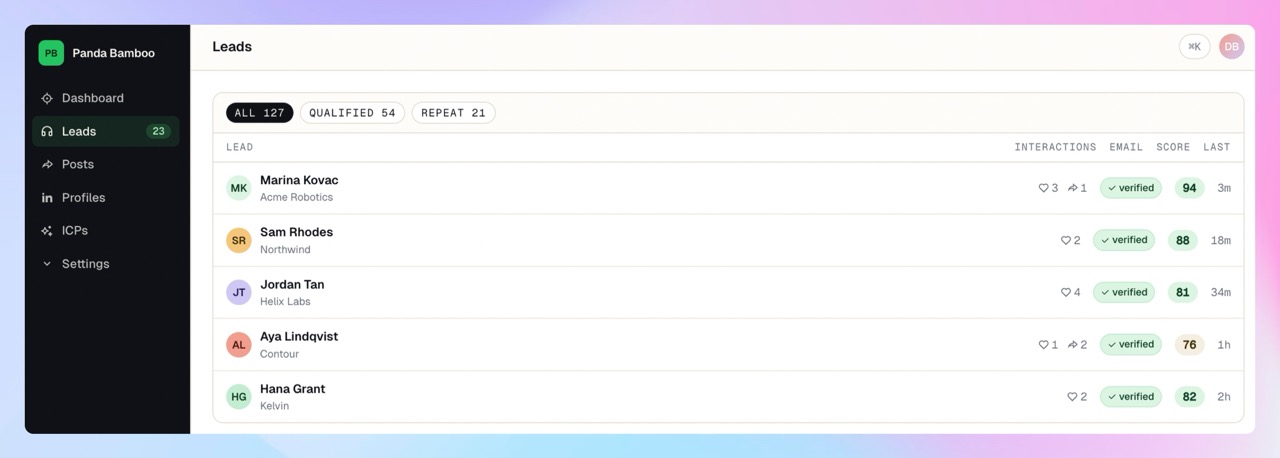
There is no browser extension inside your account and no automation acting from your LinkedIn session. Pricing starts with a $10 pay-as-you-go top-up. At one credit per new profile and one additional credit when a verified email is found, that is enough to capture and qualify roughly 100 profiles end to end.
Edge Cases Worth Knowing
Company page posts and personal profile posts both produce useful comment signals, but the engagement pattern is different. Company pages often attract customers, vendors, and employees. Personal posts often attract peers, operators, and buyers willing to speak more candidly.
Boosted posts can also confuse the numbers. Paid distribution has its own analytics surface, and the public comment thread may not match the reporting view the advertiser sees.
Finally, pay attention to replies. The most interesting signal is not always the top-level comment. In technical categories, the buying objection, implementation detail, or competitor comparison often appears three replies deep.
Related Workflows
- How to see who liked a LinkedIn post: use the same capture and qualification workflow for reactions.
- Track competitor LinkedIn engagement: monitor the posts your buyers already pay attention to.
- Find work emails for LinkedIn post engagers: turn profile URLs into verified contact data.
- Enrich and score the commenters: add company, role, email, and fit context before routing anyone to sales.
FAQ
Why is LinkedIn not showing all comments on a post?
The default "Most relevant" sort hides comments LinkedIn scores as lower value. Switch to "Most recent" to see the fuller list. Beyond that, gaps can come from deleted comments, restricted visibility settings, deactivated accounts, and reshares carrying part of the conversation.
Can someone see that I viewed their comment or profile?
Reading comments is invisible. Opening someone's profile can show up in their "who viewed your profile" area depending on your visibility settings. Set your profile viewing mode to private in LinkedIn settings if that matters for your research.
Can I export LinkedIn comments to Excel or a CRM?
Not natively. LinkedIn does not provide a standard CSV export for comments or reactions. You either copy manually, use an extension that acts inside your account, or use a session-free tool that captures engagement from the post URL or tracked profile. Start with the LinkedIn engagement CSV export guide, then use Linked Panda's CRM export workflow when the list needs to move into sales.
Is collecting commenter data against LinkedIn's terms?
Automating actions inside your own LinkedIn account is the behavior most likely to create account risk. Working from public data without automating your session is the more conservative approach. This is not legal advice, so read the terms and decide your own risk tolerance.
Are commenters better leads than likers?
Usually. A comment carries text you can qualify and personalize against. Repeated engagement across several posts is the strongest signal of all, which is why tracking beats one-off scraping.
The Practical Takeaway
If you only need to inspect one post, open it, click the comment count, switch to "Most recent," and expand the replies.
If you need comments as a repeatable lead source, the native workflow will not hold. Capture the commenters, preserve the full text, enrich the profiles, score them against your ICP, and route only the high-fit people to sales.
That is the workflow Linked Panda handles. Top up $10 in pay-as-you-go credits and test it on a real post your buyers care about.