How to Track Competitor LinkedIn Engagement Without Checking Manually
Three practical ways to track competitor LinkedIn engagement, from a free manual workflow to a fully automated system that enriches, scores, and routes high-fit leads.
You know the routine. Open LinkedIn before standup, check two competitor profiles, scroll their latest posts, click into the reaction lists, screenshot the engagers you recognize, and hope you remember to come back later. By lunch, the same thing happens again. By Friday, the spreadsheet has six useful names, a dozen half-copied profile URLs, and no clear owner.
The people liking and commenting on competitor content are often some of the warmest possible buyers in your market. They are publicly raising their hand on your category, your problem space, or a vendor they already know. The hard part is finding a way to track competitor LinkedIn engagement without opening the feed five times a day. This guide gives you three workable methods - free, semi-automated, and fully automated - so you can pick the right level of effort for your team.
Why Competitor Engagement Is a Buying Signal Worth Tracking
A like is not a signed order. A comment is not a demo request. But both are public commitment signals, and that makes them stronger than a passive ad impression or a profile view you cannot explain.
When someone engages with a competitor's case study, hiring post, pricing update, or feature announcement, they are telling you something about their current attention. A VP of Sales who likes your competitor's product launch post may be researching tools in your category. A RevOps manager who comments on a competitor's integration update may be looking for a better workflow. A current customer who engages with a competitor's pricing change may be a retention risk worth watching.
The same signal works beyond prospecting. Competitor engagement can reveal active buying committees, talent pools, partner opportunities, and customers who are comparing alternatives in public. LinkedIn's own help docs explain that post and engagement visibility depends on the author's visibility setting, and posts set to "Anyone" can appear to people on or off LinkedIn. That is why public engagement is one of the cleaner inputs for engagement-based outbound, because the timing comes from something the buyer did voluntarily.
Most teams still miss it for a simple reason: the workflow does not scale. Manual spot-checks are fine for a founder watching one rival. They fall apart when a sales team wants to monitor competitor LinkedIn posts across five accounts, enrich the engagers, score fit, and hand clean records to reps.
Quick Comparison
| Method | Best for | Cost | Setup time | Risk |
| Manual tracking | 1-2 competitors, founder-led research, low post volume | Free | 30-60 minutes | Low, but hard to sustain |
| Semi-automated stack | 3-5 competitors, ops-owned workflow, existing Sales Navigator seat | $50-200/month plus time | 2-6 hours | Medium if browser tools act inside LinkedIn |
| Fully automated tracking | 3+ competitors, sales team, enrichment and CRM routing needed | From $74/month or $10 pay-as-you-go top-up | 15-30 minutes | Lower when no LinkedIn login or extension is required |
Method 1: Manual Tracking
Manual tracking is the right place to start if you have no budget, a tight category, and only one or two competitors worth watching. It is also the best way to learn what good signal looks like before you buy anything.
The workflow is straightforward:
- Bookmark the competitor profiles, executive profiles, and company pages you care about.
- Set a daily 15-minute calendar block to review their last 5-10 posts.
- Click into the reaction count on relevant posts and scan the visible engagers.
- Capture promising names in a spreadsheet with name, role, company, LinkedIn URL, post URL, action, and date.
- If the competitor is a Company Page, turn on LinkedIn notifications for page mentions and related updates where available.
Manual review is useful when post volume is low and the owner is close to the market. A founder in a niche B2B category can learn a lot by reviewing two competitor pages every morning. A first SDR can use it to build a lightweight target list before the company has a RevOps stack.
It breaks quickly past that. Three or more competitors means too many posts. A post with 50+ likes means too much clicking. If you need work emails, company size, CRM ownership, or team visibility, the spreadsheet becomes the bottleneck. Anything beyond a week of history also gets unreliable because LinkedIn makes older engagement harder to inspect and your notes become stale.
The practical limit is about 30 minutes a day. Past that, manual tracking starts eating the same selling time it was supposed to create.
Method 2: Semi-Automated With Browser Tools and Sales Navigator
The middle-ground stack is common because it feels practical: use Sales Navigator for account context, use a browser tool for one post at a time, enrich the exported list somewhere else, and push the useful records into CRM.
A typical setup looks like this:
- Sales Navigator saved searches for target accounts, current customers, and buyer titles.
- Sales Navigator alerts for job changes, account news, and people who match your saved filters.
- A browser extension or scraping helper that can export the visible engager list from a single LinkedIn post.
- A spreadsheet or Clay table where exported profiles are deduped and cleaned.
- Apollo, Hunter, or another enrichment source for email, title, company domain, and firmographics.
- Zapier or Make to create CRM records, tasks, or Slack alerts when a row passes your rules.
This can work. It is much better than copy-pasting names by hand, and a good sales ops person can maintain it for a small team. It also gives you flexibility. You can test competitors one by one, decide which posts are worth exporting, and tune the enrichment rules before committing to a dedicated engagement product.
The tradeoffs are real.
First, browser extensions that scrape LinkedIn or automate actions inside your session can put the account at risk. Some teams accept that risk. Others use a secondary seat. Either way, read each tool's terms and understand what is acting inside LinkedIn on your behalf.
Second, the cost adds up. The extension, enrichment tool, spreadsheet automation, and CRM automation may each look cheap alone. Together, the stack often lands around $50-200 per month before you count the hours spent maintaining it.
Third, it is still manually triggered. Someone has to decide which post to export, run the export, clean the rows, resolve duplicates, and check whether the enrichment produced usable records. There are no real-time alerts when a new VP of Sales likes a competitor's announcement five minutes after it goes live.
This method fits a sales ops person with 4-6 hours per week to maintain the process, some technical comfort, and tolerance for LinkedIn gray areas. It is less suitable for reps who need a clean daily list without operating the machinery.
Method 3: Fully Automated Engagement Tracking
Fully automated competitor engagement tracking means the workflow runs whether or not a rep remembers to check LinkedIn.
In practice, that means you add a competitor's profile or company page once, then the system watches new posts and captures every relevant like and comment. New engagers are enriched with work email, role, company, company size, industry, location, and other B2B context. Lead enrichment turns the raw LinkedIn profile into a record your CRM can actually use.
The next step is filtering. A raw engager list always contains noise: interns, recruiters, journalists, vendors, students, and people outside your market. ICP scoring keeps those people from cluttering the pipeline. High-fit leads get routed to CRM or outbound. Everyone else stays searchable, but they do not become rep work by default.
The important product boundary is account safety. A fully automated listening service should not need your LinkedIn login, a browser extension, or a headless browser clicking through your account. That avoids the account-automation risk that comes with many scraper-style workflows.
This is where Linked Panda fits. Panda watches likes and comments on tracked profiles, enriches new engagers, scores them against your ICPs, and routes the qualified ones forward. You can track your own team, competitors, category creators, partners, or industry voices from the same workspace.
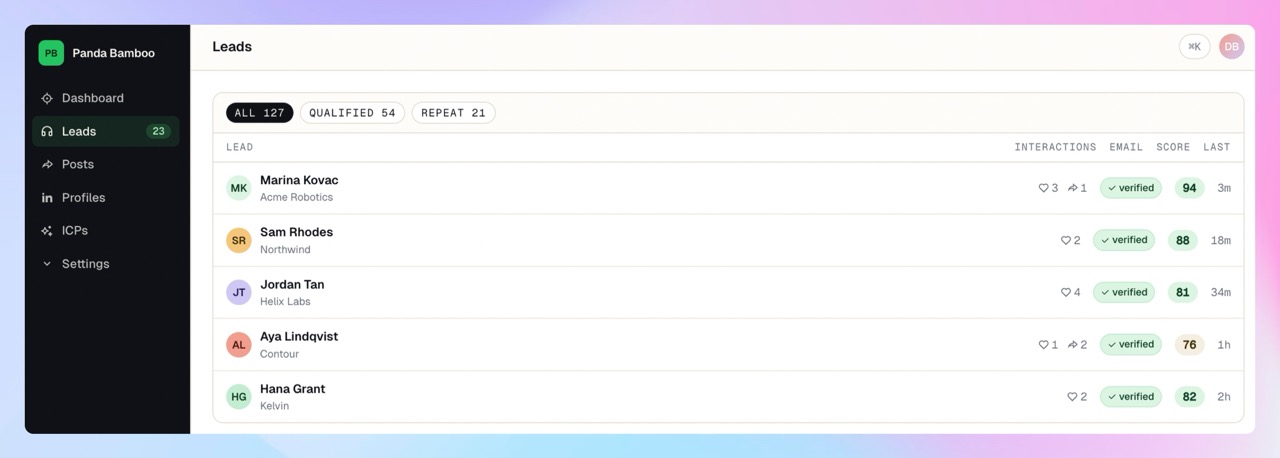
A simple workflow looks like this:
- Add the competitor profiles and company pages that attract your buyers.
- Panda watches every new post they publish.
- Every like and comment is pulled into your workspace.
- Engagers are enriched with verified B2B data.
- ICP scoring filters out people who will never buy.
- The SDR opens HubSpot in the morning and sees fresh prospects who engaged with competitor content yesterday.
Pricing note: Starter is $74/month with 2,000 credits, Growth is $144/month with 5,000 credits, and Scale is $229/month with 10,000 credits. Scale tracks up to 20 profiles; smaller plans track fewer, which is often enough if you are starting with your sharpest competitors. Pay-as-you-go is $0.05 per credit with a $10 minimum top-up. Credits never expire.
That matters because competitor tracking should not require a six-month contract before you know whether the signal is useful. Start narrow, prove that the engagers include buyers, then expand to more profiles.
Which Method Should You Pick?
Use the smallest method that gives you reliable coverage.
If you track one or two competitors, have no budget, and mostly want market awareness, use the manual workflow. Bookmark the profiles, schedule a daily 15-minute review, and keep the spreadsheet simple.
If you track three to five competitors, already have Sales Navigator, and have someone technical enough to maintain a stack, semi-automation can be a reasonable bridge. Account risk, tool sprawl, and ongoing maintenance time still need to be part of the decision.
If you track three or more competitors for a sales team, need enrichment, or want CRM integration, use a fully automated tool. The time math usually flips around three competitors. At that point, a $74/month tool is cheaper than the rep-hours spent scrolling, copying, enriching, deduping, and routing by hand.
The key question is not "Can we do this manually?" You can. The better question is "Will we still be doing it correctly two weeks from now?"
Common Mistakes When Tracking Competitor Engagement
Tracking only the CEO's profile leaves signal on the table. Competitor founders may get the most visible engagement, but important signals often happen on company pages, product leaders' posts, sales leaders' posts, and employee posts about launches or customer stories.
Comments matter more than likes. A comment is usually a stronger signal because the person is adding context in public. If you want to see who likes a competitor's LinkedIn posts, include comments in the same workflow.
Same-day outreach feels desperate. Wait three to five days, let the signal inform your prioritization, and use a normal business reason for the conversation.
Do not mention the engagement directly in outreach. "I saw you liked our competitor's post" is accurate, but it often feels creepy. Use the signal for targeting, not as the opening line.
Engagement alone is not enough. Without enrichment and scoring, you will waste time on people who are interested in the category but cannot buy.
Patterns beat one-off reactions. The best lead is rarely the person who liked one random post. It is the person who engaged three times in 30 days across competitor content, customer stories, and category conversations.
FAQ
Can you see who commented on a LinkedIn post if you're not connected?
Yes, public comments are visible in most cases. If the post or comment has restricted visibility, you may only see the portion LinkedIn allows you to access. LinkedIn's post visibility help page explains that visibility depends on whether the author chose Anyone, Connections only, or Group.
Is it legal to track competitor LinkedIn engagement?
Yes, as a practical matter, public engagement can be monitored. The safer path is using third-party data providers that collect public signals instead of tools that scrape inside your own LinkedIn session or automate actions from your account. Outreach to those engagers still has to comply with GDPR, CAN-SPAM, and your local equivalents.
How often do competitors notice they're being tracked?
They generally do not. Viewing a public post is not the same as viewing a profile, and public engagement lists are meant to be visible. Do not interact from your personal account just to collect data.
What if my competitor's account is private?
You cannot reliably track a private profile. Pivot to their company page, public employee posts, founder posts, partner posts, and category creators who attract the same audience.
Can I export competitor LinkedIn engagers to my CRM?
LinkedIn does not provide a native export for regular users. You need a manual spreadsheet workflow, a semi-automated stack, or a tool like Linked Panda that captures, enriches, scores, and routes qualified engagers.
Stop Scrolling Competitor Profiles
If you are watching one competitor, a spreadsheet is enough. If you are past three competitors and tired of the manual scroll, Linked Panda handles the workflow end to end: listening, enrichment, ICP scoring, and CRM routing.
Sign up for Linked Panda and start tracking the profiles your buyers already follow. Your first payment — pay-as-you-go top-up or plan, either qualifies — comes with 3× credits as a one-time welcome bonus. Either way, reps get to work the people who actually fit, not the long tail of category lurkers.