How to Find the Work Email of Someone Who Liked Your LinkedIn Post
Four practical ways to find the work email of a LinkedIn post engager, from a manual lookup to automated capture, enrichment, verification, and ICP filtering.
A VP of Sales at a perfect-fit company just liked your LinkedIn post. You have two minutes between meetings. What is the fastest way to get her work email and follow up before the moment goes cold?
That moment happens every day for founders, B2B reps, recruiters, and consultants who post on LinkedIn. The signal appears in the reaction list. The profile looks promising. Then the workflow stalls: open the profile, find the company, guess the email, verify it, paste it somewhere, remember what post they liked, and write something that does not sound like surveillance.
The email is usually findable. The hard part is choosing the right workflow for your volume. If this happens once a month, a manual lookup is fine. If it happens fifty times a week, one-by-one email finding becomes the place warm signal dies.
This guide covers four methods to find the work email of a LinkedIn engager, ordered from free and manual to paid and automated. It also covers deliverability and compliance, because getting an address is not the same as sending safely.
Before You Start: What You Actually Need
Any method works better if you have three things:
- The engager's LinkedIn URL. A name is not enough. Common names create false matches, and profile URLs make enrichment tools much more accurate.
- Their current company. Sometimes the URL or headline hides this. Open the profile and confirm where they work before looking up an email.
- A business reason to email them. "I saw you liked my post" is not the reason. The post tells you timing. Their role, company, and likely problem tell you what to say.
That last point matters. The best workflow does not just find an email. It preserves enough context to write a relevant, compliant follow-up.
Quick Comparison
| Method | Best for | Cost per email | Time per email | Scales to |
| LinkedIn-native, no email | One-off warm signal, low volume | Free or InMail credit | 2-3 minutes | ~5/week |
| Manual email finder | Occasional outreach, single-person follow-up | $0.05-0.30 | 3-5 minutes | ~20/week |
| Browser extension | Frequent ad-hoc lookups, recruiter-style workflows | $50-150/month | ~30 seconds | ~50/week |
| Automated capture + enrichment | Treating engagement as a pipeline source | $0.05/credit PAYG or subscription | Background | 100+/week |
Method 1: Connect on LinkedIn First
Sometimes you do not need the email.
If the person just engaged with your post, a LinkedIn connection request can be a better first move than a cold email. That is counterintuitive if you were trained to default to outbound sequences, but the channel match matters. They saw you on LinkedIn. They acted on LinkedIn. Starting in the LinkedIn inbox can feel more natural than immediately showing up in their work email.
Send the connection request without a note. That sounds wrong, but short personalized notes are often indistinguishable from automated sales notes, and many buyers now ignore them. A clean request is lower-friction.
After they accept, send a non-pitch DM. Do not reference the like. Look at their profile, current role, company, and recent activity, then send something that would make sense even if you had never seen the reaction. If they are a VP of Sales hiring SDRs, ask about pipeline hiring. If they lead RevOps, ask about the operating problem your post covered.
If you have Premium or Sales Navigator, InMail is another option. It costs an InMail credit and does not require a connection, but it still needs the same restraint. No pitch on touch one. No "saw you liked my post."
Start here when the signal is strong enough that a connect is not out of place, you are playing a longer game, and you would rather use the LinkedIn inbox than risk a cold email landing in spam.
The approach stops working when they do not accept, when you need to hand the person to an SDR, when the lead needs to enter a CRM sequence, or when you need enrichment fields for ICP scoring.
Method 2: Use Manual Email Finder Tools
This is the workflow most people mean when they search for how to find a work email from a LinkedIn post.
Open the engager's LinkedIn profile. Copy the profile URL. Confirm the current company. Then paste the URL, company domain, or name into an email finder. The tool returns a work email, often with a confidence score or verification status. If the first tool fails, try a second one. Email providers have different data sources, and cross-checking can lift the hit rate.
The common tools each have a different shape:
- Hunter: Strong for domain-first workflows. Useful when you know the company website and want to find the email pattern.
- Apollo: Broad B2B database. The free tier often covers one-off lookups, especially for common sales and marketing roles.
- Clay: Overkill for one person, but useful if you already use Clay for enrichment workflows and want a single-row lookup.
- Findymail, Skrapp, and Anymailfinder: Specialist email finders with slightly different coverage. Worth testing when your main provider misses.
Realistic hit rates are usually 60-85%, depending on your market and the tool. Senior buyers at well-known companies are easier. Founders at small companies, consultants, people in regulated industries, and anyone with a messy job history are harder.
The cost per found email is low, usually $0.05-0.30. The time cost is the ceiling. Three to five minutes per person sounds fine until you have 20 engagers to review: open profile, copy URL, check company, paste into tool, verify, copy the address, paste into your outbound tool, and preserve the post context. That is where the workflow starts eating selling time.
This method fits solo founders who post weekly, BDRs running a small list, and anyone who treats LinkedIn engagement as occasional signal rather than a systematic pipeline source.
Method 3: Use Browser Extensions for Instant Lookup
Browser extensions are the middle ground. Tools like RocketReach, ContactOut, Lusha, and Wiza can surface email data directly on LinkedIn profiles.
The workflow is fast:
- Install the extension and log in.
- Visit the engager's LinkedIn profile.
- Click the "show email" or enrichment button.
- Reveal the work email and spend a credit.
That can cut a lookup from five minutes to 30 seconds. It is attractive if you do frequent ad-hoc lookups across LinkedIn, recruiting lists, conference pages, and prospect research.
The tradeoffs are worth taking seriously.
First, browser extensions are usually more expensive than manual one-off tools, often $50-150/month. Second, any extension that runs inside your LinkedIn session can read data from the pages you visit. Some LinkedIn-related extensions have run into Chrome Web Store or platform policy issues over the years. Read the privacy policy, understand what the extension can access, and consider using a separate browser profile.
Third, an extension does not understand engagement context. It can tell you the email on a profile, but it does not remember which post the person liked, whether they engaged before, or whether they fit your ICP. That context still lives in your head, your screenshots, or a spreadsheet.
This fits recruiters, agency BDRs, and consultants doing high-volume ad-hoc lookups. It is less ideal if your real goal is to act on post engagement, because the extension does not know which engagers are yours.
Method 4: Automated Capture and Enrichment
The first three methods start with, "I have a specific person. Find their email."
If LinkedIn engagement is becoming a real channel, the workflow should run the other direction: "Who engaged with my posts in the last 24 hours, which of them fit our ICP, and which verified work emails are ready for follow-up?"
That is the engagement-native workflow.
Add your own LinkedIn profile and any team profiles to a tool like Linked Panda. It watches new posts and captures every like and comment automatically. Each engager is enriched with verified work email, role, company, company size, industry, and other firmographics. Then ICP scoring filters out students, recruiters, vendors, peers, and people outside your buyer band.
The result is not "everyone who liked your post." It is everyone who liked your post and actually looks like someone you should work.
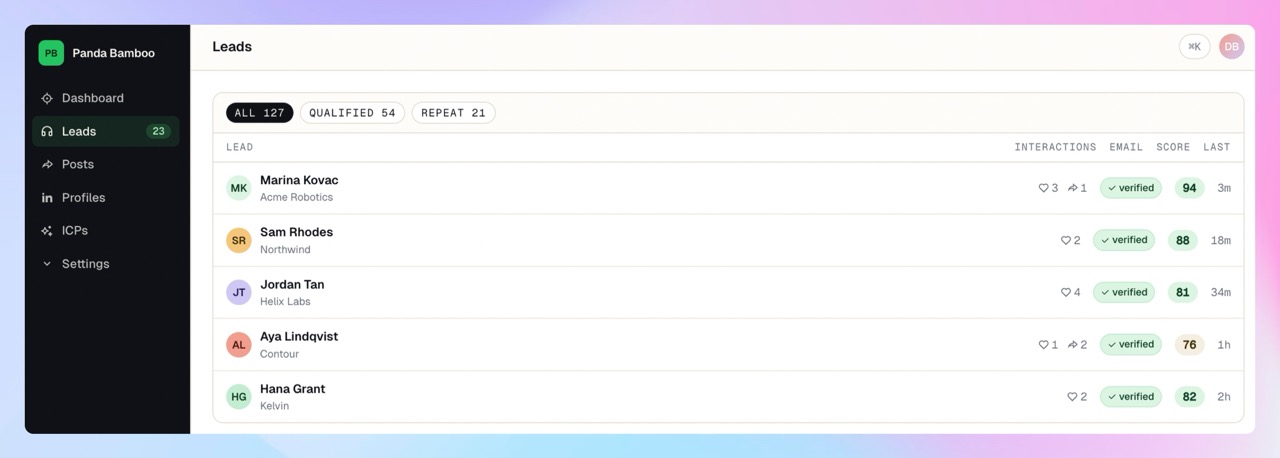
The account-safety boundary matters. Linked Panda does not need your LinkedIn login. It does not run a browser extension inside your session. It does not scrape from your own account. That avoids the account-restriction risk that comes with extension-driven workflows.
Pricing stays low-commitment: pay-as-you-go starts at a $10 top-up. Credits cost $0.05 each. A new profile costs 1 credit to capture, and a verified email costs 1 additional credit when found. That means $10 gives you 200 credits: enough for 200 profile captures before email verification, or roughly 100 profiles end-to-end when every one gets a verified email.
This fits founders posting three or more times a week, B2B teams whose content consistently attracts buyers, and agencies running engagement plays for clients. It also pairs naturally with lead enrichment, competitor tracking, and category tracking for buyers already engaging with your market.
Email Verification and Deliverability: Finding Is Not Sending
A found email is not automatically a deliverable email.
Email quality usually falls into three buckets:
- Verified: The provider has confirmed the address accepts mail. This is the best case.
- Catch-all: The domain accepts mail broadly, so the provider cannot confirm the specific inbox. This is medium risk.
- Guessed: The address is pattern-matched, such as
firstname.lastname@domain.com, without verification. This is high bounce risk.
The mistake is treating all three as equal. Sending to unverified addresses can create bounces, and bounces hurt sender reputation. A few bad sending days can damage a domain enough that even good emails start landing in spam.
Do not send volume cold outreach from your main company domain. Use a separate sending domain, configure SPF, DKIM, and DMARC, and warm it up before pushing real volume. Always verify before sending. Most enrichment tools include verification, but check the status before a lead enters a sequence.
Aim for a bounce rate under 2%. Over 5% is dangerous. If you are above that, pause, clean the list, and fix the source before sending more.
This is the part most "find email from LinkedIn" guides skip. The address is not the asset. Deliverable, context-rich contact data is the asset.
Compliance and the Don't-Be-Creepy Rule
There are two layers: legal and social.
The legal layer depends on where you and the recipient are. In the EU and UK, GDPR can allow B2B prospecting under legitimate interest, but work emails tied to identifiable people are still personal data. The data must be relevant, the recipient must be able to opt out, and the processing should be documented.
In the US, CAN-SPAM is more permissive but still has clear rules. The FTC's CAN-SPAM compliance guide says commercial email must avoid misleading headers and subject lines, include valid sender information, and provide a working opt-out. Canada, Australia, Brazil, India, and other markets have their own regimes, and some are stricter than CAN-SPAM.
The simple rule: do not email anyone you could not justify in writing as a relevant business contact, and always include opt-out.
The social layer is simpler. Do not reference the like in your email. "I saw you liked my post" reads as surveillance, even when it is accurate. Use engagement to prioritize the email, not to write it. The signal tells you when. The buyer's role, company, and context tell you what to say.
Wait three to five days if you can. Same-day email feels too immediate unless there is an obvious public reason to reach out.
Common Mistakes
Sending unverified emails protects a quick win at the expense of sender reputation. One bad list can hurt every future campaign from that domain.
Mentioning the LinkedIn engagement turns warm signal into cold-feeling outreach. Keep the targeting private and the message normal.
Treating one like as a buying signal overstates the data. One like is awareness. Three engagements in 30 days is signal.
Using the same outreach template for every engager wastes the context. Engagement gives you a clue about timing, but the profile and company should shape the message.
Mixing engagement-based emails into your main domain's main sequence creates reputation risk. Use a separate domain, separate warm-up, and separate reputation.
Ignoring compliance because "everyone does it" is lazy risk management. Fines, spam complaints, and domain blocks happen to individual senders. The herd does not protect you.
FAQ
Can I find someone's email if their LinkedIn profile doesn't show their company?
Sometimes. The headline often reveals it. If not, check recent posts, experience history, or company mentions. If you still cannot confirm the company, ask for context in a connection request instead of guessing.
Are email finder tools accurate?
Hit rates are usually 60-85%, depending on the provider, company size, role, and market. Cross-checking two providers can lift confidence, especially when one returns a catch-all or guessed address.
Is it legal to email someone whose work email I found via LinkedIn?
In many B2B contexts, yes, if the contact is relevant and your process follows the rules that apply to the recipient's market. GDPR is usually the strictest common regime, so make sure you can defend relevance, minimization, and opt-out.
What if the person has a personal email listed but no work email?
Do not use the personal address for B2B cold outreach. Hit rate is not the only constraint. Appropriateness matters, and work email is the right channel for business prospecting.
Should I use multiple email finders?
For one-off lookups, yes. Trying a second provider can rescue a missed address. For volume, pick a provider with built-in verification and consistent exports so you can control bounce risk.
One Email Is a Tool Problem. Engagement Is a Workflow Problem.
If you have one person in mind, Methods 1-3 are fine. Connect on LinkedIn, use an email finder, or reveal the address with an extension.
If this is happening every week and you are losing the thread, the problem is no longer "what is this person's email?" It is "which engagers are worth working, and can we get them into the pipeline before the signal goes stale?"
Sign up for Linked Panda and turn LinkedIn engagement into a working pipeline. Your first payment — a top-up or a plan, either qualifies — comes with 3× credits as a one-time welcome bonus, yours to spend on capturing profiles, verifying emails, and proving the channel before committing long term.