How to Find Buyers on LinkedIn Who Already Like Your Category
A four-step framework for finding in-market LinkedIn buyers by tracking category engagement, enriching the right people, and filtering for ICP fit.
An ICP list looks clean on paper: VPs of Sales at SaaS companies with 100-500 employees, based in North America, using HubSpot or Salesforce. It is a reasonable starting point. It is also why so much cold outbound converts badly.
Every name on that list is at a different point in the buying cycle. Some are actively trying to fix pipeline this quarter. Some solved the problem last year. Some are not thinking about it at all. ICP filters tell you who could buy. They do not tell you who is paying attention today.
You have probably tried to close that gap with intent data, G2 reviewer lists, ad audiences, or scraped prospect lists. Each can work, but each gets expensive or noisy fast.
There is a simpler layer most teams miss: people who publicly engage with LinkedIn content about your category. Pricing posts, "we switched from X to Y" posts, hot takes from category creators, customer stories, and operator teardown posts all create voluntary, real-time signals. These are not exactly competitor engagers. They are people raising their hand on the problem before they have anchored on one vendor.
This post gives you a four-step framework to find LinkedIn buyers interested in your category without scrolling for an hour a day.
Why Category Engagement Beats ICP-Only Targeting
ICP targeting answers the first question in outbound: who could buy from us? That matters. A Head of RevOps at a 300-person SaaS company is more likely to buy a RevOps workflow tool than a student, a recruiter, or a founder at a two-person agency.
But ICP alone misses timing. The 300-person SaaS company might be locked into a contract, fully staffed, and not reviewing tools until next year. The title and company filters are right, but the moment is wrong.
Category engagement adds the timing layer. When someone engages with content about the problem you solve, they are telling you they are paying attention now. That does not make them ready to buy immediately, but it is a stronger reason to prioritize them than a static database row.
Three signal types are especially useful:
- Category creator posts: When a buyer engages with posts from founders, operators, newsletter authors, or creators who write about your category, they are saying, "I follow this space, and I have opinions."
- Peer workflow posts: When someone likes or comments a "we switched," "we built," or "we tried" post from another operator, they may be benchmarking their own setup against peers.
- Vendor-neutral category posts: When someone engages with analyst, VC, newsletter, or community posts, they may be educating themselves before a formal buying process.
This is different from competitor tracking. Competitor engagers already have a mental model that includes one specific vendor. Category engagers are earlier, less anchored, and often higher-volume. Your message has more room to land because the person is engaging with the problem, not necessarily with a named solution.
The compounding signal is even stronger. Someone who engages with one post about outbound might be casually browsing. Someone who engages with three different outbound posts across two creators in 30 days is much more likely to be in-market. If you already use engagement-based outbound, category tracking is the broader audience layer above competitor tracking.
What Counts as Your Category on LinkedIn?
Before tracking anything, define the category from the buyer's point of view.
A category is the conversation your buyers are already having when they describe their problem. For a sales tool, the category might be "outbound," "pipeline generation," or "sales productivity," not "AI software." For a security product, it might be "vendor risk management," "SOC 2 readiness," or "third-party risk," not "B2B SaaS."
Use four questions to narrow it:
- What words do buyers use to describe the problem, not the words your team uses to describe the solution?
- Who are the 5-10 creators who write the most-shared content using those words?
- What recurring formats get useful engagement: think pieces, vendor comparisons, customer stories, hiring posts, teardown posts, or "we built X" posts?
- Which company pages publish category content that attracts your target roles?
Keep the first list tight. Ten to twenty sources is enough. The common mistake is tracking 50 profiles, collecting thousands of reactions, and then discovering that half the list is interns, recruiters, vendors, and people who like every viral business post they see.
Smaller is better because precision compounds downstream. If the source list is sharp, enrichment and ICP scoring work with a clean signal. If the source list is fuzzy, every downstream filter has to fight noise.
Step 1: Identify the Right Voices to Listen To
This is the highest-leverage step. Get the listening list wrong and every step after it becomes cleanup.
Start with category creators. These are independent or semi-independent voices who write about the problem space: founders, ex-operators, newsletter authors, podcast hosts, and consultants with a clear point of view. Their audiences include buyers because people gather in the comments around specific work problems. A category creator's audience is usually more useful than a generic influencer's audience because people follow them for a specific job-related problem.
Next, add practitioners with audience. These are VPs, Heads of, directors, and senior ICs who write about how they actually solve the problem. For B2B, this is gold. Peer-to-peer engagement reveals working operators, and working operators often attract peers with similar problems. A Head of RevOps writing about routing logic may pull in other RevOps leaders who are wrestling with the same thing.
Then look for customer-style posts from non-competitors. These are adjacent companies that publish workflow content, customer stories, operational lessons, or implementation posts that overlap with your buyer's world. Their engagers may not be evaluating your category directly, but they often face the same underlying problem from another angle.
Finally, add analyst and investor profiles where relevant. Partners at funds, analysts at category-relevant firms, and operators who publish market maps can attract senior buyers and category-curious decision-makers. The engagement volume may be lower than creator posts, but the seniority can be better.
Avoid four anti-patterns:
- Do not track generic business influencers. High engagement does not mean high buyer density.
- Do not track only the loudest people in the category. Second-tier voices often have smaller but more concentrated buyer audiences.
- Do not track competitors in this workflow. That is useful, but it is a separate motion with different intent and message timing.
- Do not track only your own team. That tells you who likes your content, not who is engaging with the category before they know you.
For example, a RevOps SaaS company might start with 10 sources: three RevOps newsletter authors, two VP of RevOps practitioners with real audiences, two sales VCs who write about go-to-market systems, and three adjacent founders who post about pipeline operations. That is enough to produce meaningful signal without drowning the team.
Step 2: Track Engagement on Those Profiles
Once the listening list is right, the operational workflow looks similar to competitor tracking: monitor new posts, capture likes and comments, dedupe profiles, enrich the people, and filter for fit.
The difference is volume. Category creators usually post more often than competitor company pages, and good creator posts can pull hundreds of reactions from mixed audiences. That means the workflow needs frequency thresholds.
Manual tracking works for three to five profiles if you are disciplined. Review posts daily, click into reaction lists, and capture promising people in a spreadsheet. It breaks once creators post often enough that yesterday's useful signal is buried under today's new posts.
Semi-automated workflows have the same tradeoffs as the competitor workflow: browser exports, spreadsheet cleanup, enrichment tools, and CRM automation. They can work, but category creators create enough volume that manual exports get stale fast.
Fully automated tracking is the cleanest version. A tool like Linked Panda can track any public profile your buyers pay attention to, capture likes and comments as they happen, enrich the profiles, and route the qualified ones forward. Lead enrichment turns the raw LinkedIn profile into title, company, email, and firmographic context. ICP scoring keeps the noisy engagers out of the rep queue.
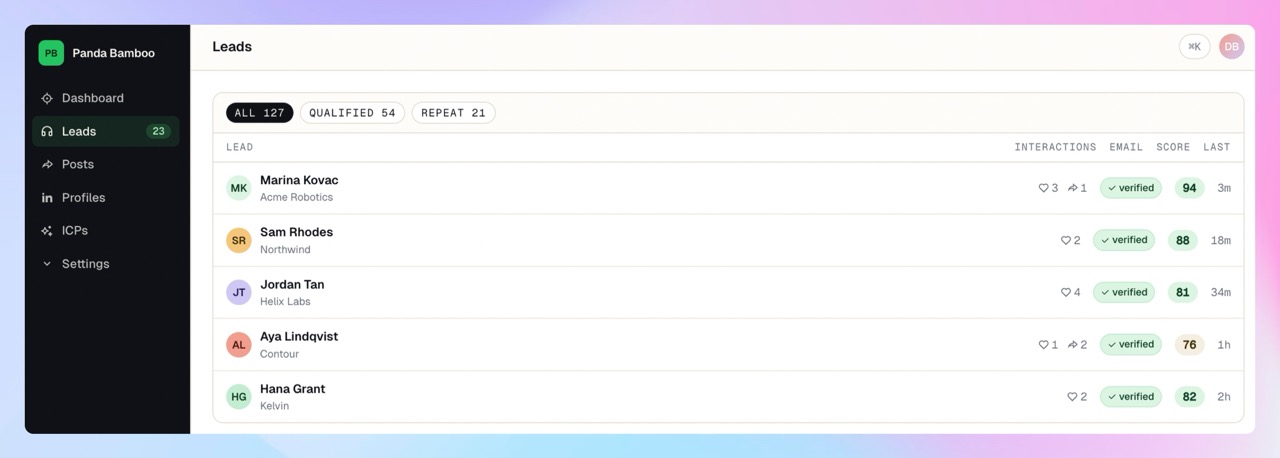
Set the first filter around repeated engagement. One like on one category post is weak. Two engagements in 30 days is worth reviewing. Three or more engagements across two sources in 30 days is a strong signal. Whatever tool you use, sort by engagement count or filter for repeat engagers before sending anything to sales.
Step 3: Filter for ICP Fit
Category engagement without ICP filtering is a trap.
The audience around a category includes people you cannot sell to: students, jobseekers, recruiters, consultants, vendors, journalists, peers at competitor companies, and buyers in segments your company does not serve. If you route every category engager to reps, the motion will look busy and feel useless.
Layer the filters in this order:
- Title fit: Focus on target buyer roles and strong influencers, not every vaguely relevant title.
- Company size: Keep the band you actually close. A 20-person company and a 5,000-person company may engage with the same creator for different reasons.
- Industry: Prioritize the verticals where your proof and messaging already work.
- Geography: Apply this if sales coverage, language, compliance, or data rules make it relevant.
- Negative filters: Remove current customers, open opportunities, churn-risk accounts that need CS handling, competitors, students, and vendors.
This is the layer that converts category interest into a sales-actionable list. Most B2B teams should expect only 15-30% of category engagers to pass ICP filters. That is not a failure. It is the point. You want reps working the minority of people who both care about the problem and look like real buyers.
Step 4: Reach Out Without Sounding Like You've Been Watching Them
The targeting signal should improve prioritization, not become the opening line.
Never write, "I noticed you liked Alex Rivera's post about cold outreach." It might be true, but it feels scraped. The same goes for comments or repeated engagement. People do not want to feel like a CRM event.
Use the signal to decide who deserves research. Then reach out for normal business reasons. If they engaged with a post about pipeline gaps, lead with pipeline gaps. If they engaged with a post about vendor risk workflows, lead with the operational risk. Make the outreach about the problem, not the act of engagement.
Wait three to five days after the engagement so the timing is not obvious. For the strongest signals, use a light multi-channel sequence: LinkedIn connect with no pitch, a relevant email a week later, and no product pitch before the second touch. The goal is to enter the conversation at the right time without making the source of your timing feel invasive.
This is the kind of workflow Linked Panda routes to CRM: enriched, pre-filtered, pre-scored LinkedIn buyers who are ready for normal sales work, not a raw list of everyone who clicked Like.
Common Mistakes When Finding Buyers on LinkedIn
Tracking too many sources too soon creates noise. Start with 10 profiles. Expand only after you know which sources produce ICP-fit buyers.
High engagement count is not the same as good signal. A generic business influencer with 500 likes can be worse than a niche category creator with 40 reactions from real operators.
Fuzzy category definitions create fuzzy lead lists. If you cannot name the buyer conversation clearly, the listening list will drift into broad-market content.
Category engagement and competitor engagement are not the same workflow. Competitor tracking has stronger vendor-specific intent. Category tracking has broader volume and earlier timing. Use both, but score and message them differently.
Outreach before ICP filtering burns rep time. Reps should not be asked to interpret raw engagement lists full of students, vendors, and peers.
Listening lists go stale. Category creators rise and fall. Review the source list every quarter and cut profiles that produce volume without qualified buyers.
FAQ
What's the difference between category tracking and intent data tools?
Intent data tools like 6sense or Bombora combine broader behavioral signals, including web visits and content consumption. Category tracking on LinkedIn is narrower, public, cheaper to test, and closer to real-time conversation.
How many category creators should I track?
Start with 10. Expand to 20 after you know which sources produce ICP-fit buyers and which only produce noise.
Do I need to follow these creators on my personal LinkedIn?
No. Tracking through a tool does not require you to follow, connect, like, comment, or interact from your personal account.
How is this different from buying a list from Apollo or ZoomInfo?
Lists give you ICP fit. Category engagement adds timing. The best results usually come from combining both: fit from enrichment, timing from engagement.
Can I do this without a tool?
Yes, for one to three creators. Past that, the post volume and reaction lists make the manual workflow hard to maintain.
Find Buyers When They Are Paying Attention
ICP lists go cold because most good-fit accounts are not in-market today. Category engagement adds the missing timing layer: people paying attention to the problem right now.
Linked Panda lets you track the profiles your buyers already follow - competitors, category creators, partners, practitioners, and industry voices - from one workspace. Then it enriches the engagers, scores them against your ICP, and routes the best-fit buyers forward. The targeting stays private; the conversation stays normal.
Sign up for Linked Panda and start tracking the profiles your buyers already follow. Your first payment — a pay-as-you-go top-up or a plan, either qualifies — comes with 3× credits as a one-time welcome bonus.